Tree
The Tree is used to access all company related information, schedules, and forms.
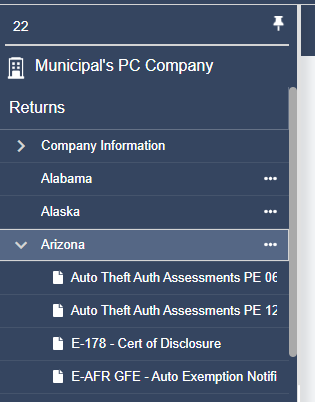
Company Information
The Company Information folder will include the General Information form, Address Schedule, Payment Request Schedule and the Login Schedule.
Summary Schedules
The Summary Schedules folder will include the payment request schedule and the actions report.
State/jurisdiction
All available jurisdictions will be displayed in the navigation tree. If the state has active forms, there will be a down arrow  next to the name of the state; otherwise, no forms have been activated for that state.
To activate a jurisdiction, right click on the jurisdiction name in the tree, and select “Activate.”
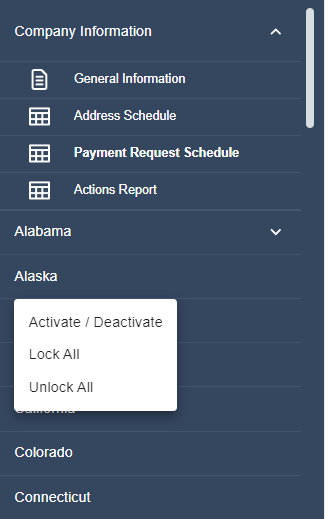
This will bring up a list of inactive forms for that jurisdiction.
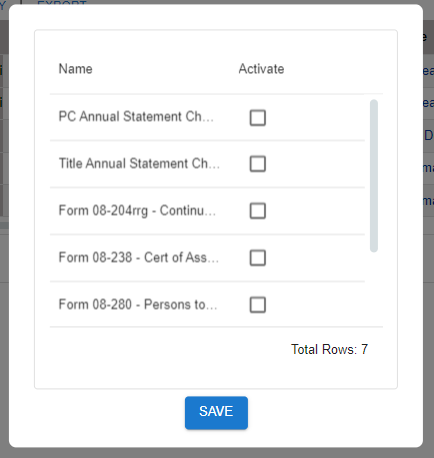
To activate a form, check the box next to the desired form and click Activate. Multiple forms can be activated at the same time by selecting multiple checkboxes before clicking Activate.
Once a form has been activated, it will appear in the tree. Jurisdictions can be expanded or collapsed by clicking the arrow next to the jurisdiction name.
If an active form is no longer needed, it can be deactivated by right-clicking the form or jurisdiction and selecting Deactivate. To deactivate multiple forms at once, right-click any form or jurisdiction name to open the selection window, uncheck the desired forms, and click Save. A confirmation message will appear before the forms are deactivated.
Warning: Deactivating a form will permanently delete all data entered in that form. While the form can be activated again later, previously entered data cannot be recovered.
Related Articles